Pixel Pro 2 - Watch face
SP WatchesLifestyle
4.11.00 Reviews
- Version
- Varies With Device
- Installs
- 10.00K
- Age Rating
- Everyone
Screenshots
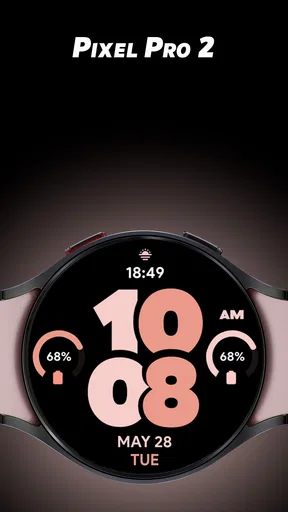
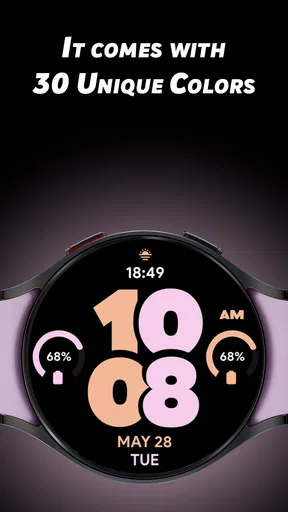
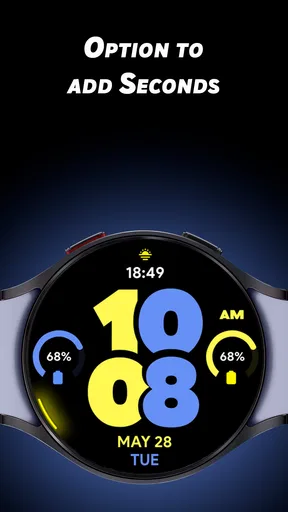
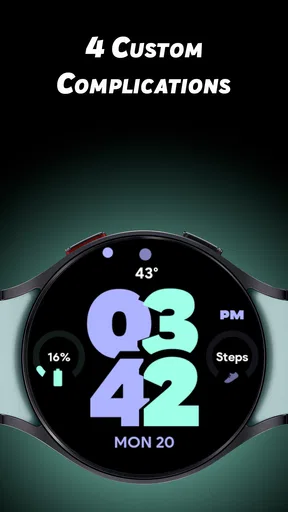
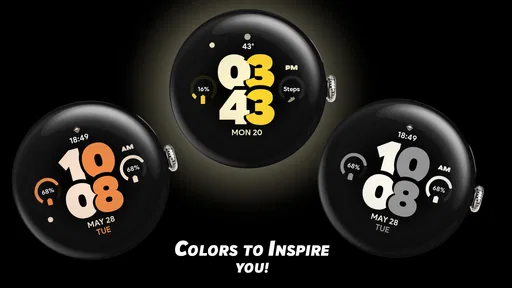
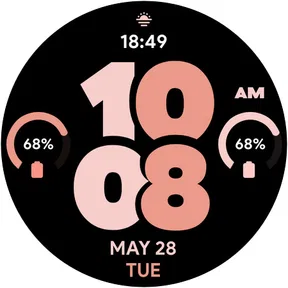
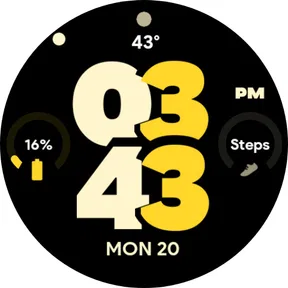
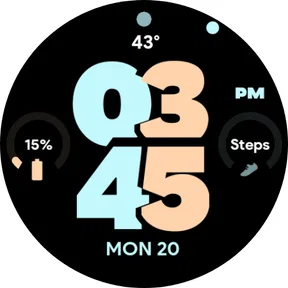
Our Review of Pixel Pro 2 - Watch face
 Analysis by Appyee
I often think of a watch face as the part of a smartwatch that quietly shapes the whole experience: it is the screen I see when I check the time, and the one other people may notice when we share a glance at the wrist. Pixel Pro 2 - Watch face is a paid Wear OS customization app from SP Watches, aimed at people who want a bolder, more colorful look than the face already on their watch. Its appeal is visual first, so I would consider it for a personal style refresh rather than as a way to add new watch functions.
A face that suits one wearer, not every wrist
In a household where people borrow or share devices, a watch face can become a small point of coordination: a clear, distinctive design makes it easier to recognize whose watch is whose at a glance. That is a practical benefit of choosing a face with a strong look, though it does not make the watch itself a shared account or family-management tool. I would treat the display as personal decoration and keep each person’s device, settings and accounts within their own usual boundaries.
That distinction matters if a watch passes between adults or is handed to a child for a moment. A customized face changes what is shown on the wrist, but it should not be mistaken for a way to control notifications, purchases or access. For a shared household, I would choose a design that is easy to read for the primary wearer and avoid relying on the face to communicate private information to everyone nearby.
First Impressions
When I first downloaded the Pixel Pro 2 - Watch face, I was immediately struck by its sleek and modern design. The app has a minimalistic interface, making it super easy to navigate. You don’t need to be a tech wizard to figure it out, which is always a plus in my book.
Installation was a breeze. Within minutes, I had transformed my watch face from drab to fab. The app offers a variety of faces to choose from, each with its own unique style. Whether you're into digital designs or prefer something more classic, there's something here for everyone.
What the style means in daily use
SP Watches describes the visual direction through a material-inspired palette and oversized, bold presentation. That gives the face a clear identity: it is for someone who wants the time display to make a statement, not fade into the background. The trade-off is that a high-impact look may not fit every setting. I might prefer a quieter, more conventional face for a formal occasion, while the bolder option feels more at home during errands, commuting or casual wear.
Before settling on a design, I would check it in the situations where I actually glance at my watch: outdoors, while moving, and under indoor lighting. A face that looks striking in a setup screen can feel too busy or too prominent during a quick time check. This is also a useful way to decide whether the style works with a particular watch case and band, rather than judging it in isolation.
Features That Stand Out
One of the features I absolutely love is the customization options. You can tweak everything from the color scheme to the type of information displayed. Want to keep it simple with just the time and date, or load it up with weather updates, step counts, and notifications? The choice is yours.
The app also boasts a battery-friendly design. I was initially worried that all these cool features would drain my battery faster than you can say "low power mode," but that wasn’t the case. The developers have clearly put a lot of thought into optimizing the app's performance.
Oh, and did I mention the interactive widgets? These allow you to interact with your watch face in real-time, accessing information without needing to dive into multiple apps. It’s like having a mini control center right on your wrist!
Making the face useful without crowding it
For a practical setup, I would start with only the information I check repeatedly and leave less urgent details off the main screen. A glance at the time should remain effortless; adding every available indicator can make a bold face feel cluttered, especially on a small display. If the wearer values a clean look, the simpler arrangement is likely the better choice. Someone who regularly checks activity or weather may prefer those details close at hand, if the watch and chosen layout support them.
There is a useful trade-off here between convenience and visual calm. A complication or shortcut earns its place when it saves a repeated trip into another app; otherwise, it is just another element competing for attention. I would adjust the layout around a real routine—perhaps checking the date before leaving home or activity progress after a walk—rather than trying to use every option simply because it is available.
For a household with more than one watch wearer, this is also where personal preferences matter. One person may want a glanceable display with only the essentials, while another might be happier with more information on screen. A shared style can make devices feel coordinated, but forcing the same layout on everyone defeats the point of customization. I would let each wearer choose the balance that works for their own eyesight, habits and watch size.
Compatibility and Usability
Compatibility is key when it comes to apps like this, and I’m happy to report that Pixel Pro 2 - Watch face plays nice with a wide range of smartwatches. Whether you’re rocking the latest Android Wear or sticking with an older model, you shouldn’t run into any issues.
Usability is top-notch. The app runs smoothly, and I haven’t encountered any bugs or crashes. It’s refreshing to use an app that just works, without any glitches to spoil the experience.
Choosing it over the usual alternatives
The ordinary alternative is to keep the watch’s built-in face, which is the simplest route and costs nothing extra. That makes sense if the default already gives you the look and readability you want. A general face with a more restrained design may also suit someone who prefers understated styling. I see this app as the more deliberate choice for Wear OS users who specifically want a prominent, modern appearance rather than a neutral screen.
It is worth separating a watch-face app from a full watch companion or fitness app. Its job is to change the watch’s presentation and, where supported, bring selected information closer to the surface; it is not a substitute for health tracking, messaging or device management. If your main goal is richer training analysis or controlling a shared device, I would look to the relevant dedicated tool instead of expecting a face to do that work.
There is also a small setup trade-off: the face is a personal choice, so the wearer may need to spend a moment deciding what should be visible and what should stay out of the way. That is not difficult, but it does mean the best result is not necessarily the first layout chosen. I would make one adjustment at a time, wear it through a normal day, then decide whether anything genuinely needs changing.
Price, age context and household expectations
The app costs $0.99, so I would weigh the purchase against how much the look matters to you. It has an average rating of 4.1 from 83 ratings, and more than 10K installs. Those figures suggest it has found an audience, but they do not tell me whether its particular style will suit your wrist; that is a personal call. The app is rated Everyone, and it was released on May 20, 2024.
For a parent or caregiver considering it for a young wearer, the Everyone rating is useful context about the app, not a promise that a watch is automatically appropriate for every child or household. I would still make the decision based on the watch, its account setup and the family’s own expectations around notifications and screen use. The face itself should not be treated as a parental-control feature.
If adults coordinate watches for a shared outing, a matching visual theme can be a fun, low-effort choice, but it will not synchronize schedules or ensure everyone sees the same alerts. For that, ordinary calendar and communication tools remain the better fit. The face can make a device feel personal and recognizable; coordination beyond that needs to happen through the tools the household already uses.
Why You Should Try It
If you’re looking to give your smartwatch a stylish makeover, Pixel Pro 2 - Watch face is definitely worth a look. It’s packed with features, easy to use, and brings a touch of personalization to your wearable tech. Plus, its energy-efficient design means you won’t have to sacrifice battery life for aesthetics.
The personalization options are where this app truly shines. It's not just about looking good; it's about tailoring your watch face to fit your lifestyle. Whether you're a fitness enthusiast needing quick access to health stats or a busy professional wanting to keep tabs on notifications, this app has got you covered.
In a world where everyone seems to have the same gadgets, it’s nice to have something that sets yours apart. So, why stick with a boring, default watch face when you can spice things up with the Pixel Pro 2 - Watch face? Give it a try, and watch how it transforms your smartwatch experience.
Who I would recommend it to
I would shortlist this for a Wear OS owner who enjoys changing the look of their watch, values a bold display and is happy to spend a little time choosing a layout that fits their routine. It is especially appealing if the default face feels too plain and you want a more expressive screen for everyday wear. If you share a household, the purchase makes most sense for the person who actually wears and personalizes that watch, not as a family utility everyone needs to install.
I would skip it if you are satisfied with the included face, prefer a very subdued style, or are shopping for deeper smartwatch functions rather than appearance. I would also avoid buying it for someone else without checking their taste: a prominent face is exactly what some people enjoy and what others find distracting. Since it is a paid app, even a modest price is better spent when the design is a deliberate choice rather than a surprise.
A realistic day with it
Picture checking the time while getting ready, glancing at the date before setting off, then looking at your wrist during a walk or a busy stretch of errands. In that sort of day, the face earns its place when the information you chose is immediately readable and the design remains comfortable to look at. If you reach for the phone just as often because the screen is crowded, that is a sign to simplify the arrangement rather than add more details.
At home, another person might notice the distinctive colors and ask about the watch, but the useful household decision is still about whose wrist it is and what that wearer wants visible. I would not use a shared watch face as a substitute for separate accounts or a conversation about notifications. Keeping the display personal helps avoid the mistaken expectation that a visual customization also coordinates devices or protects private information.
My household verdict
Pixel Pro 2 is best understood as a paid style choice for an individual Wear OS wearer, with a bold presentation that can make a familiar watch feel more personal. For a household, its value is modest but clear: it can help each person choose a look they recognize and enjoy, while leaving accounts, communication and supervision to the appropriate settings and tools. I like the idea when the design is what you are buying; if your priority is a quiet default screen or practical family coordination, another option will serve you better.
Verdict
Strengths of Pixel Pro 2 - Watch face
- Highly customizable with various themes.
- Smooth integration with smartwatch features.
- Battery-efficient design preserves device life.
- Regular updates with new features and fixes.
- User-friendly interface for easy navigation.
Limitations of Pixel Pro 2 - Watch face
- Limited free features; many require purchase.
- Occasional sync issues with some devices.
- Initial setup can be slightly complex.
- Some themes lack color customization.
- May not support older smartwatch models.
Similar Picks in This Category
View All
SmartThings
Samsung Electronics Co., Ltd.4.6

Google Home
Google LLC4.0

Pinterest4.2

Astrotalk - Talk to Astrologer
Astrology & Horoscope4.7

My Verizon
Verizon Consumer Group4.5

Samsung Wallet (Samsung Pay)
Samsung Electronics Co., Ltd.4.1
Frequently Asked Questions
What features does Pixel Pro 2 – Watch face offer?
Pixel Pro 2 – Watch face offers a variety of customizable features, including multiple watch face styles, color themes, and interactive widgets. Users can personalize the display with information such as weather updates, battery status, and step count, making it both functional and stylish. Its user-friendly interface ensures seamless customization.
Is Pixel Pro 2 – Watch face compatible with all smartwatches?
Pixel Pro 2 – Watch face is designed primarily for Wear OS devices. It's essential to ensure your smartwatch is running on Wear OS for optimal performance and compatibility. Before downloading, check your device specifications to confirm compatibility and enjoy the full range of features offered by the app.
How does Pixel Pro 2 – Watch face impact battery life?
Pixel Pro 2 – Watch face is optimized to minimize battery consumption. However, the impact on battery life can vary based on the customization options selected and the frequency of updates for widgets like weather and notifications. Users can adjust settings to balance performance and battery efficiency.
Can I use Pixel Pro 2 – Watch face offline?
Yes, Pixel Pro 2 – Watch face can be used offline, but certain features requiring internet connectivity, such as real-time weather updates, won't be available. Basic functionalities and customizations will still work, allowing you to enjoy a personalized watch face without an active internet connection.
Is there a cost to download Pixel Pro 2 – Watch face?
Pixel Pro 2 – Watch face is available for download with a basic free version offering limited features. For additional customization options and premium features, users can opt for in-app purchases. This allows flexibility based on user needs and preferences, catering to both free and premium users.
